 Cadenivo
A free organisational template for specialists and families
Session and appointment planner
A planned appointment, a completed session and a rescheduled meeting are different records. This planner keeps the calendar status and preparation together, with room for a clear next step.
No sign-up needed. Open the CSV in Excel, Google Sheets or LibreOffice.
How to use the planner
- Record the date, time and timezone when the family is in another region.
- Use the actual status: planned, completed, rescheduled or cancelled. When rescheduling, retain the original date and the new agreement.
- Before the session, list the materials. Afterwards, note the practice shared with the family and what needs preparing next.
- For a shorter appointment, agree the duration and fee separately. For example: 15 minutes with an explicit one-off fee; half the time does not automatically mean half the fee.
- Check the plan against your calendar. This sheet is not an invoice, receipt or clinical billing record.
An example using synthetic data
Original appointment: 14 October, 4 pm, the specialist’s timezone. Status: rescheduled by agreement. New appointment: 16 October, 4 pm. Material: kit 2. Family practice: to be assigned after the session. Next step: confirm the new date with the family.

Blank session planner
On a phone, scroll the table. Fill in the downloaded file or a printed copy.
| Date / time / timezone | Appointment status | New date if rescheduled | Materials | Family practice | Next step |
|---|---|---|---|---|---|
This template organises appointments and preparation. The specialist selects session content, methods and home practice.
One group appointment, individual fees
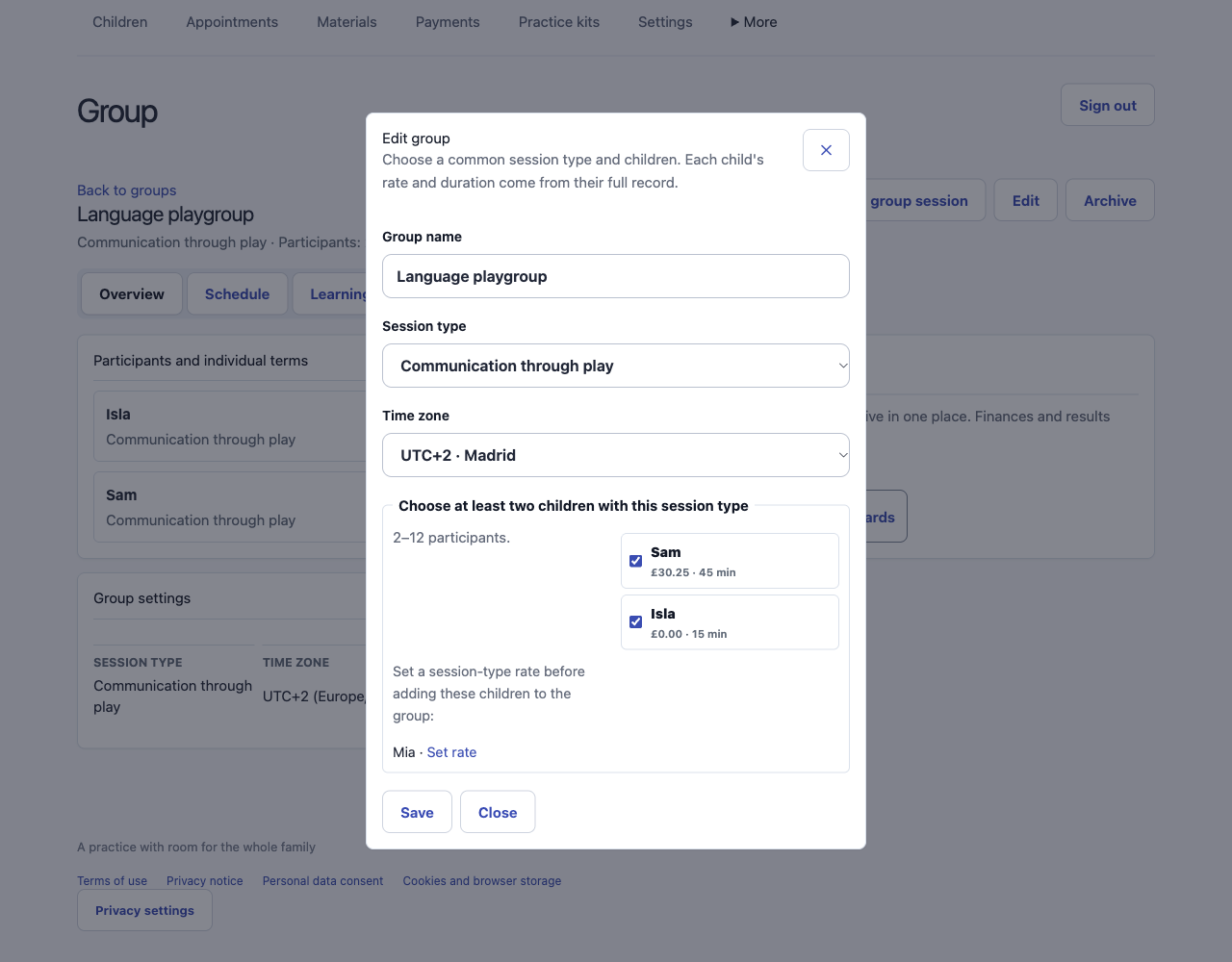
When two children attend together, the shared time belongs in one calendar entry. Each child still needs their own agreed session type and rate.
- Set the same session type for each child first. Enter an explicit rate: 0 means a free session. A child with an unset rate cannot be selected for the group; the form links back to their rate settings.
- Open Groups, choose that session type and select 2–12 children. Check the individual amounts before saving. One free place and one paid place remain separate terms; there is no shared amount to divide.
- Schedule the group time, duration and timezone. Changing the shared duration does not recalculate the children’s saved rates. Keep attendance and each family’s payment record separate.
Planning the group does not record money received. Record an actual payment separately in the relevant family account.
Keep your schedule beside the child records
Cadenivo keeps the schedule, child records and home practice in one workspace. You can create appointment series, reschedule and cancel sessions. When planning the next session from a board, enter its duration and one-off fee in the service currency; the usual service rate stays unchanged. A scheduled appointment does not mean payment has been received.
Create your workspace